Coding Agents: Are They Making Me Dumber?
Am I still in control? Do I really know what I’m doing? Lately, I’ve had to ask myself these questions more and more often. The source of my discomfort: coding agents, or more general, AI.
As a professional web developer, I’ve been using AI tools for several years now. I’ve been reluctant at first, even skeptical. The constant hallucinations and often outdated code produced by generative AI were a dealbreaker for me. On top of that, there’s the environmental impact and mental health issues. Yuck!

Photo: © Alex Knight / pexels.com
But the tools were getting better. My employer kept encouraging me to use the GitHub Copilot AI assistant they provided me with. So, I gradually gave in.
Just to be clear: I’m (still) far away from being a vibe coder who doesn’t even read their own code anymore. But I must be honest with myself: AI tools have become an integral part of my daily work. And sometimes, I get the feeling that I’m losing control. That my reliance on AI is making me dumber.
That’s why I decided to write about it. To share some of my thoughts and trepidations with the world.
GitHub Copilot: My Overzealous Assistant
At work, I mainly use GitHub Copilot as my coding agent. I can open a dedicated window in Visual Studio Code, select from a list of LLM models and start prompting. I’ve been using Claude models like Opus and Haiku for a long time. Lately, I switched to the latest OpenAI models like GPT-6 Sol and Luna.
Are the OpenAI models better than Claude? I really don’t know. My theory is that I’m just a sucker for science fiction phrasing.
Anyway, what is it like to work with GitHub Copilot? And do I think that I benefit from using it, or does it make me dumber in the long run? Here’s a few observations I’ve made.
The No-Brainer Tasks
There are some tasks I enjoy more than others. I love to analyze an existing problem with a client and transform our thoughts into clear and precise requirements. I love to work on designs with the UI/UX department, define efficient architecture for an application, or implement complex features.
What I don’t like is to write unit tests. Or generate mock data because the actual backend isn’t ready yet. Or, the absolute worst, trying to understand a cryptic error message, wasting hours reading through blogs and Stack Overflow questions.
In these situations, I won’t even think twice about handing off the task to Copilot. It has become a reflex, pure muscle memory. And the AI usually delivers. I know how to correctly phrase the prompt, how to set the correct guardrails.
Does it always work? No. Does the AI lead me astray sometimes? Hell yeah. But most times, it helps me solve the problem or complete my task faster than if I were on my own.
We also have a strict review policy at work: Developers need to review and understand their own code, that includes code generated by an LLM. Also, every change to the codebase has to be reviewed by another person before the pull request can be merged. Every line of code is (at least in theory) subjected to human judgment.
Tell Me Who I Am
The most important lesson I’ve learned so far is: Coding agents love to run wild! They tend to overdo things.
Large language models (LLMs) are very malleable systems. You need to define clear rules and set boundaries if you want the LLM to generate consistent and robust code. In our Angular projects, we always start with a rule file that tells the AI:
You are an expert in TypeScript, Angular, and scalable web application development. You write functional, maintainable, performant, and accessible code following Angular and TypeScript best practices (and so forth)
Depending on the specific project and setup, we also define additional instructions. For example: Use the project’s custom dialog service based on the native HTML dialog element to create dialog components. Do NOT use Angular Material dialogs!
Based on these core instructions, any prompt I enter in the GitHub Copilot chat window will more likely result in generated code that meets our quality standards.
A Good Plan is Half the Battle
When I implement a new feature, I usually start in plan mode. This way, I can draft an implementation plan together with my coding agent before it is allowed to touch a single file in the codebase. The process is actually very helpful and, in my experience, leads to better results in the end.
To give you a concrete example: A few weeks ago, I worked on a vector map component that uses the MapLibre GL library. Our component takes a config object and turns it into an interactive map. You can add different layers as well as markers for points of interest.
My job was to implement a mechanism that would make it easy to define a strict layer stacking order. Something that MapLibre doesn’t provide itself, unfortunately. I had already defined a list of requirements and architectural ideas for the feature. So I used them as a starting point in my conversation with GitHub Copilot — or, more specifically, the powerful GPT-6 Sol model.
The whole planning session lasted about an hour. Copilot processed the requirements, analyzed the existing codebase and researched MapLibre itself via HTTP requests to its website. It asked me several questions. Questions about implementation details that I hadn’t thought about. I was impressed!
After several rounds of feedback, I was happy with the plan and told Copilot to switch to agent mode and implement the feature. It generated thousands of lines of code in a few minutes, including dozens of unit tests. The neck-breaking speed of LLMs is simply amazing… and also a bit scary.
I have to be honest: Reviewing all that generated code was exhausting! It’s different from reading code that you wrote yourself. Because, you already know your own code, you already processed it consciously before. Generated code, on the other hand, is a big information dump that hits you like a crashing wave out at sea.
But it’s necessary for me to review the generated code. I need to understand it. I need to be able to explain to my colleagues how it works. Fortunately, I also had to write the documentation for the new feature and use it in our internal demo application. The vector map component is part of an Angular library that we maintain and regularly extend with new features.
So, I don’t think that using GitHub Copilot in this particular way made me dumber, or a worse developer. Using coding agents, and LLMs in general, certainly poses that threat. I think, you actively have to fight this threat of cognitive decline. You need to plan, to review the generated code. You need to use that big brain of yours!
Updating my Web Server with ChatGPT
About a week ago, critical vulnerabilities in PHP forced organizations around the world to immediately update or take their websites temporarily offline. Otherwise, hackers could exploit the vulnerabilities to take control of affected web servers and steal sensitive data.
Then, on Wednesday, October 21, the next bombshell dropped: Node.js, the open source JavaScript runtime environment, shared that four high-severity vulnerabilities were just patched in its latest release. One of the vulnerabilities also allowed remote code execution.
This got me thinking: Is my web server at risk? I’m running a simple Node.js application that serves this web blog. Could someone use the vulnerabilities to hijack my server?
This sent me on a wild journey, where I upgraded my Ubuntu server, Node.js and other dependencies with the help of ChatGPT. The mission was a full success. But in the end, I asked myself: “Could I have done it without AI?” Here’s the story in three acts.
Act 1: A Fish Out of Water
I’m a frontend web developer. At work, I usually leave the backend and database tasks to my colleagues. So, yeah: The prospect of connecting to my server via SSH and running various cryptic commands in the shell did NOT fill me with joy! I was uncomfortable. Feeling like a fish out of water.
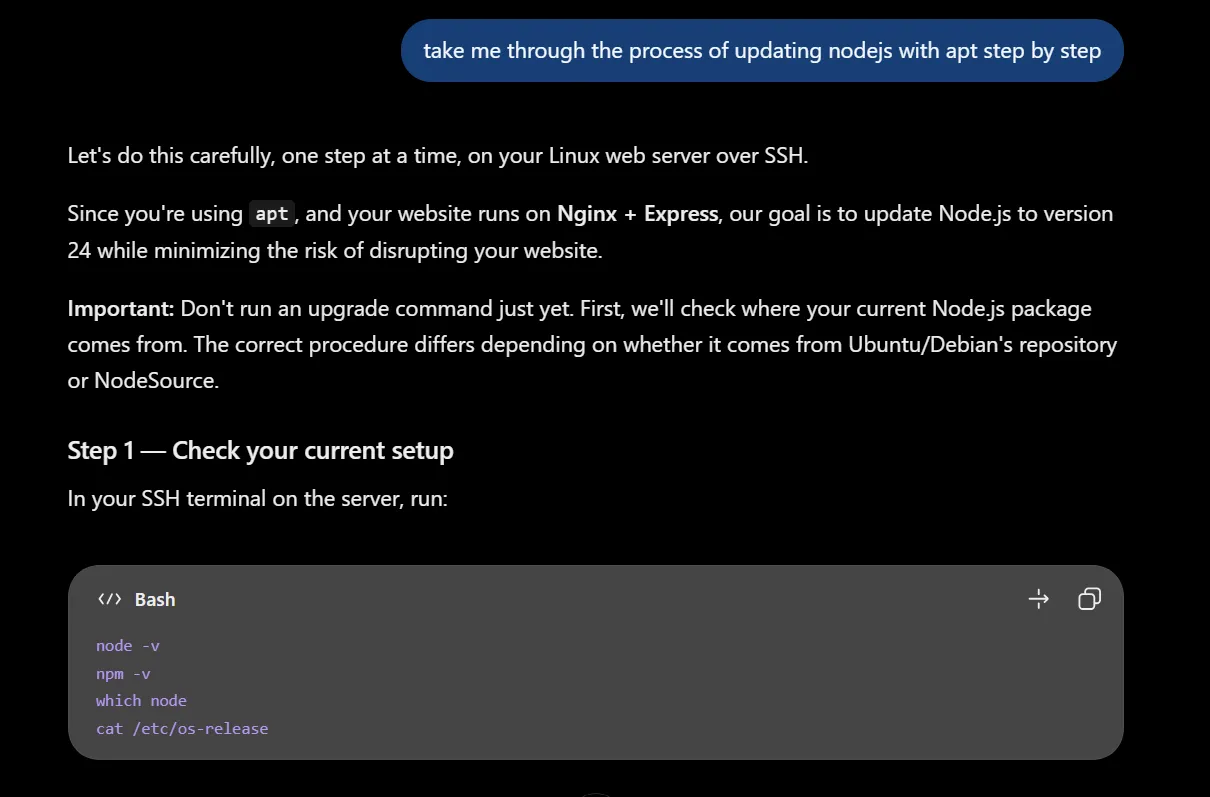
At first, I went looking for some online tutorial that would guide me through the whole ordeal. But then I thought: Hey, there’s this great thing that you can talk to in plain language and get tailored answers. So I started a new ChatGPT session and explained my situation.
My first question was: “when I update nodejs on my webserver, can this lead to problems with other programs on the server?” The AI answered. It took me by the hand and guided me through the process step by step.
Screenshot: © ChatGPT / OpenAI
Act 2: Euphoria
It soon turned out that my old Node.js version was the least of my problems. I was still running Ubuntu 18.04, a completely outdated version that doesn’t even support the current Node.js 24 LTS version. Whoopsies… Well, I did mention that I’m merely a frontend developer (awkward cough).
Anyway. ChatGPT did not laugh at me. I didn’t scold me for neglecting my web server for such a long time. It simply asked me to run some checks and then presented me with a detailed plan: Update Ubuntu one release at a time, then update Node.js and the rest.
This is, honestly, one of the main perks of AI: It’s always here to support you and answer your questions. It doesn’t get impatient or annoyed. Of course, it might make up some stuff or lead you down the wrong path. That’s why you need to stay alert and evaluate the information critically.
I also didn’t simply hand over the keys to my web server and let ChatGPT run wild. I personally executed each command in the shell. If I encountered an obstacle, I fed the output back to ChatGPT. For example, my first attempt to upgrade Ubuntu from 18.04 to 20.04 failed with the following error message:
Broken nodejs:amd64 Depends on python-minimal:amd64 < 2.7.15~rc1-1 @ii gR > Broken python2-minimal:amd64 Breaks on python-minimal:amd64 < 2.7.15~rc1-1 @ii gK > (< 2.7.15-2) …
I pasted the message into the chat window and ChatGPT explained that there was a dependency conflict due to the old Node.js 18 version and its peer dependencies. ChatGPT told me to remove Node.js first and to install it again later, after upgrading Ubuntu. It warned me to be prepared for a temporary downtime of my backend application and, therefore, my web blog.
I accepted and followed along, diligently executing commands like sudo apt remove nodejs
and dpkg -s nodejs. The chatbot explained every step with enough detail for me to feel secure. It also helped that
I’m familiar with basic Linux commands. I told myself: “I know what I’m doing!”
Then I reached my first milestone: After running for about an hour, the upgrade process to Ubuntu 20.04 was complete. I felt euphoric! My trust in the chatbot’s capabilities grew. I started to blindly follow the instructions I received. Even when I didn’t understand every detail of the command, like the following:
grep -RniE 'nodesource|certbot|droplet-agent' /etc/apt/sources.list.d/ 2>/dev/nullWhat did it matter? It worked. That’s all that counts, right?!
And so it went on for several hours: ChatGPT told me what to do and I followed along. I would always report back to my AI overlord and regularly receive encouraging feedback like: “Excellent! 🎉”
Act 3: Self-Doubt and Shame
Sometimes I hesitated. I asked myself: “Do I really know what I’m doing? Am I still in control?” It was weird. At times I felt like a remote-controlled meat bag who executed the AI’s input on the server and reported back the output. A rhythmic back-and-forth, with me in the middle: A happy, trusting fool. Giving up his agency.
Too much? A bit melodramatic? Maybe, yeah. But also, at its core, the truth — at least my personal truth; how I feel about it now.
The thing is: I didn’t really learn anything new. I don’t remember all the commands I executed. I didn’t magically become an expert in
using grep, apt and systemctl on a Linux server. Instead, I
outsourced my learning and problem-solving journey to the LLM chatbot.
Some Final Thoughts
You still there? Cool, thanks for reading through all of it.
So, what is my epic conclusion? Do I think that using coding agents makes me dumber? Honestly, I don’t know. I think that there definitely is a certain risk. But, as with all tools, it always depends on the way you use it.
I’m going to end this (overlong) post with a quote from this article:
The comfort we get when offloading our cognitive load to LLMs is bad for us. Cognitive load should exist, and if we reduce it too much — if we stop thinking — we can actually unlearn how to think.
Posted on